TLDR If your business is not showing on Google Maps, it’s usually because your Google Business Profile isn’t verified or complete, your profile lacks details, your reviews are old, your contact info is inconsistent, or your website doesn’t clearly show where you work. The good news is most of these problems can be fixed in just a few days.
Why Is My Business Not Showing Up on Google Maps?
Google only shows businesses it trusts. If your profile isn’t verified, is missing details, or has info that doesn’t match your website, Google skips you. Proximity plays a part too, but most of what keeps you hidden is fixable.
You open Google Maps, type in your business name, and nothing comes up. Your business not showing on Google Maps, while your competitors sit right at the top, is more common than you think. And it’s frustrating. You start wondering why customers can’t find you, even when they’re searching for the exact services you offer.
Many business owners think that just having a listing is enough, but small details can make you invisible. From incomplete profiles to old reviews, Google only shows businesses it trusts. Knowing what might be missing is the first step to fixing it.
This guide will explain what could be keeping your business hidden and show simple steps to make it appear on Google Maps. You don’t need any technical knowledge, just a clear approach.
Google Maps visibility is a local-search problem specifically. If you’re also weighing how much of your SEO effort should go toward local vs. broader reach, our breakdown of local SEO vs national SEO covers the key differences.
First, Check Your Google Business Profile
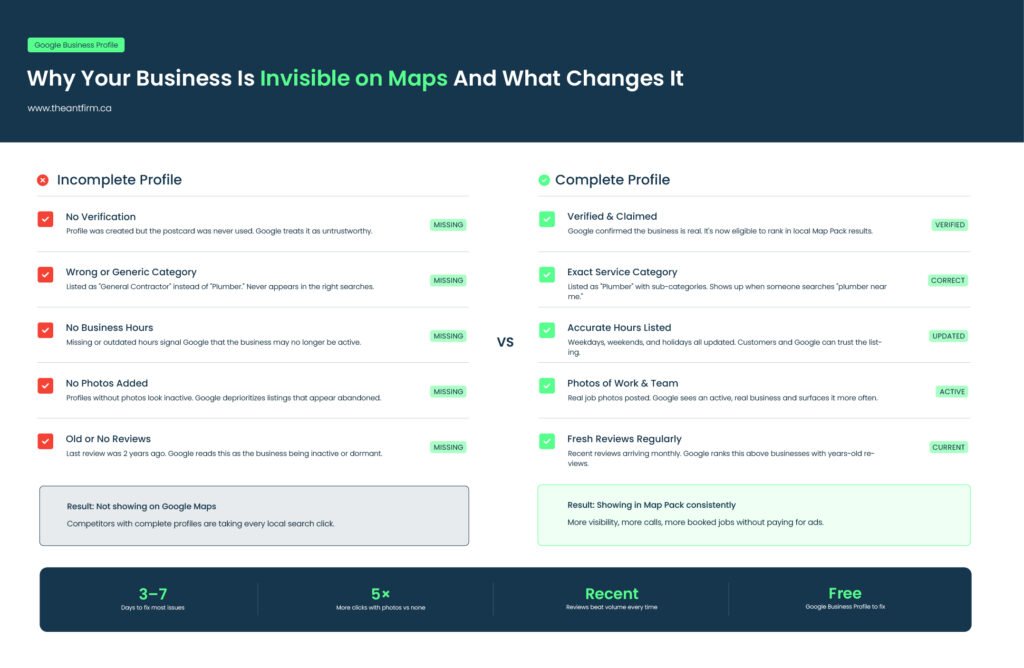
One of the main reasons businesses don’t appear on Maps is because the Google Business Profile isn’t properly set up. This is the free listing Google provides so people can find your business. Many business owners think it’s done because someone filled it out a while ago, but that’s not always enough.
An incomplete or unverified profile might mean no verification postcard, missing hours, no category, or missing phone number. If any of these are missing, Google can’t trust your business information and won’t show your listing.
Make sure your profile is claimed, verified, and fully filled out. Include hours, category, website, and a correct phone number. Once everything is in place, Google starts recognizing your business as real and trustworthy.
Not Showing Up After Verification?
Even after verification, your business may not show up. Google looks for trust signals before displaying a listing. The category you choose matters. Being listed as a general contractor instead of a plumber can hide you from local searches.
Adding photos of your work or location and posting updates helps Google see that your business is active. Think of it like a job interview. Showing up isn’t enough, you have to look the part. Google wants to be sure your business is real and providing the services it claims.
First, give it time. A newly verified profile can take a few days to a few weeks to show up in Maps results. Next, search the way a customer would. Your exact business name and “plumber near me” are two different tests, and a new profile usually shows up for its name first. Then sign in and check your profile for a status message. If Google says it’s under review or suspended, it won’t show up until that’s cleared. If you hid your address because you travel to customers, you’ll mostly show up for people searching inside the areas you listed.
Why Did My Business Disappear From Google Maps?
Showing up and then vanishing is a different problem from never showing up. Something changed. The fix starts with finding out what.
Check your profile first. If Google suspended it, you’ll see a notice when you sign in. Suspensions often follow edits that break Google’s rules, like adding keywords to your business name or listing an address you don’t work from. Fix the issue, then ask Google to review it again.
Recent edits can do it too. Changing your name, address, or category can send the profile back for review, and it may drop off Maps until that’s done.
Then look for duplicates. Two listings for the same business split your reviews and trust signals, and Google may hide one or both. Search your name on Maps and report any copy you don’t manage.
No warnings and no duplicates? You probably didn’t disappear. You slipped in the rankings. Search your exact business name. If you show up for that but not for your service, the fixes in the rest of this guide apply. Which of these sounds like your situation?
Reviews Matter, Especially Recent Ones
It’s not just about how many reviews you have, but also how recent they are. A business with eight reviews last month can rank higher than one with 80 reviews from three years ago. Ask recent customers to leave reviews. Fresh reviews show Google that your business is active and serving real customers.
Proximity: Something You Can’t Fully Control
Google shows businesses closest to the person searching first. You can’t change that. But don’t worry; proximity matters less when your profile is complete and trusted. Even if you’re a little farther away, a strong, updated profile can still show up.
Make Sure Your Contact Info Matches Everywhere
If your name, address, or phone number is different on your website, Google profile, or online directories, Google won’t trust your business. Check every place your business appears online and make sure the info is exactly the same. Consistency builds trust and helps your business appear on Maps.
Your Website Plays a Role Too
Your website confirms your location and services. Make sure it mentions Scarborough or the GTA if that’s where you work. Clearly list your services. Make sure it loads quickly on mobile devices.
Google uses your website to check that your business is real and works where you say it does. If your website doesn’t show your city or services, Google has less reason to display your business on Maps. Add location and service details to your headers or service pages.
Internal links can help too: link to a website built for your service area or check why your website isn’t getting calls to make sure customers can contact you easily.
Common Mistakes That Keep Your Business Hidden
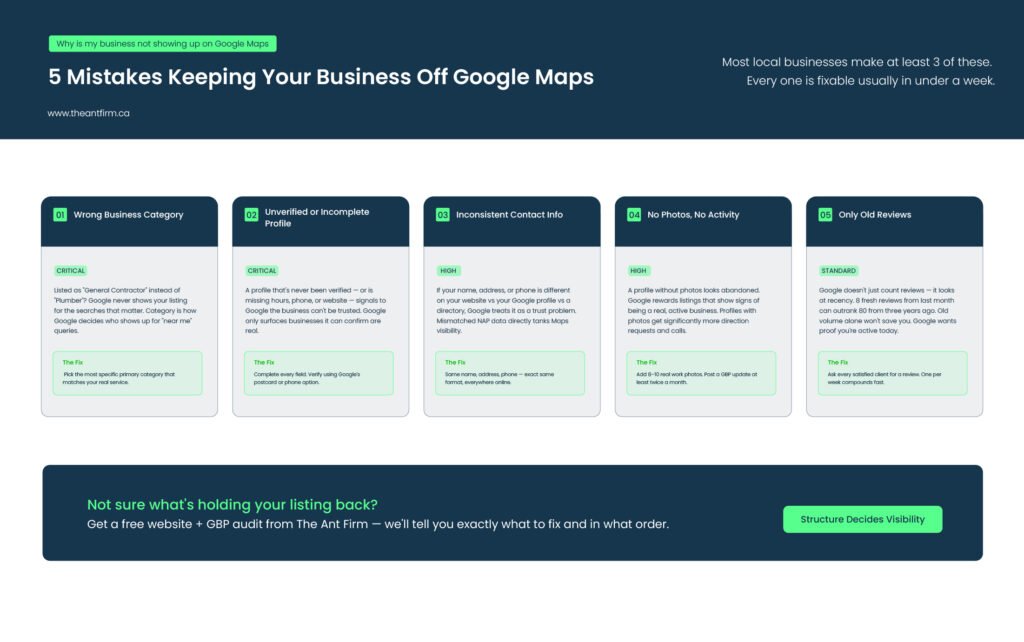
You may end up making some common mistakes that keep your business hidden. Learning about these mistakes helps you to avoid them. So, the common mistakes are:
Wrong Business Category
If you choose the wrong category, Google won’t show your business to the right customers. For example, a plumber listed as a general contractor won’t appear in plumbing searches. Choose a category that matches the service you actually provide.
Unclear Service Details
If your main services aren’t listed clearly, Google won’t know what you do. Say exactly what you offer, like “faucet repair” or “emergency plumbing”. Vague descriptions make it harder for people to find you.
Outdated Business Hours
Old or missing hours can stop your business from appearing at the right time. Make sure your hours are correct for weekdays, weekends, and holidays. Accurate hours help customers and show Google your business is active.
No Photos
Profiles without photos look inactive or incomplete. Add pictures of your team, your work, or your office. Google prefers listings that show a real, active business.
Old Reviews
Having only old reviews can make your business seem inactive. Ask recent customers to leave reviews. Fresh reviews show that Google your business is busy and trustworthy.
Fixing This Is Doable
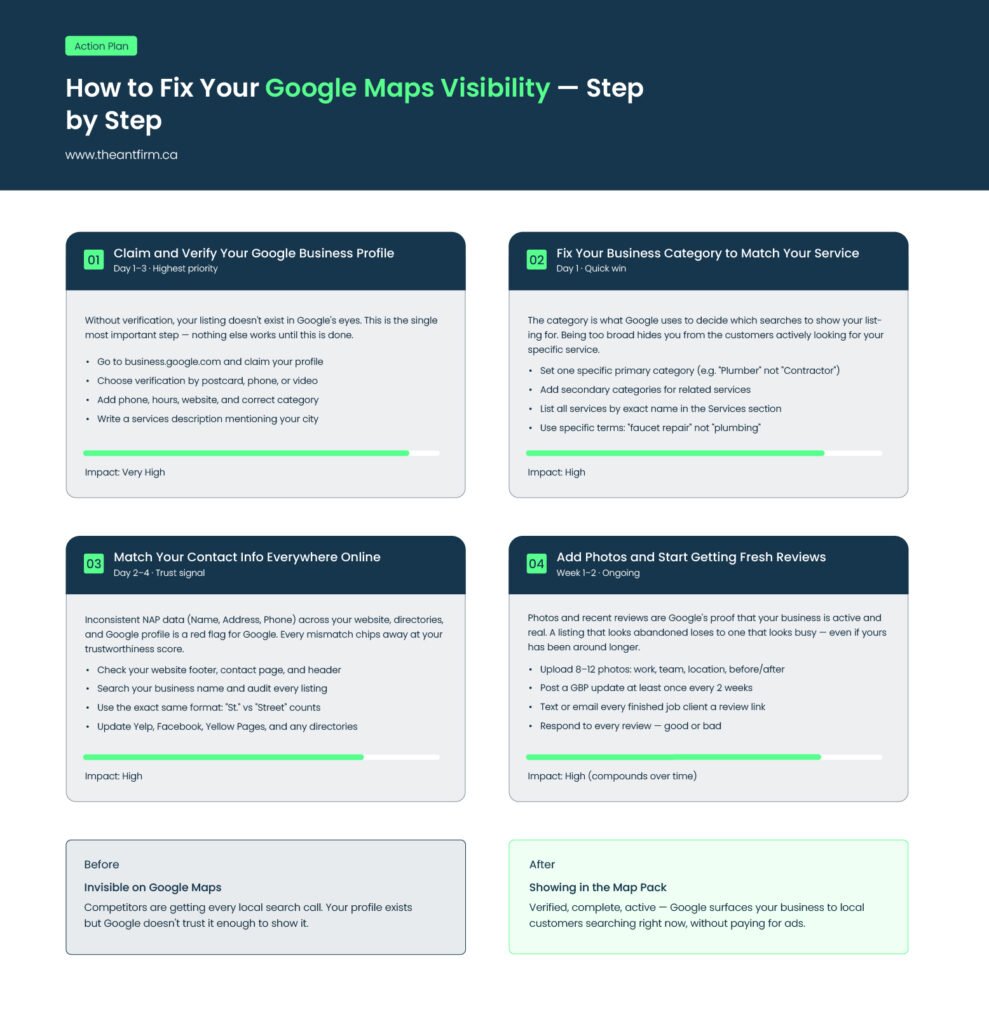
Most of these problems can be fixed in days to weeks. Businesses do it all the time. Take it one step at a time: verify your Google Business Profile, update reviews, fix contact information, and make sure your website clearly shows your services and location.
Start with a free website audit to see what may be holding your business back from showing on Google Maps.
Related Read: 3 Reasons Local SEO for Small Business Fails in Toronto
End Note
In the end, knowing why is my business not showing up on Google usually comes down to a few main reasons. Your Google Business Profile might not be complete or verified, your reviews could be old, your contact information may not match everywhere, or your website does not clearly show your location and services.
These problems can be fixed in just a few days. Make sure your profile is complete, add recent photos, get new reviews, and check that your website lists your services and area. Doing these steps will help your business appear on Google Maps, reach more customers, and get the visibility it needs.
FAQ
Q1: Why is my business not showing up on Google Maps?
Your business may not appear because your Google Business Profile isn’t verified or complete, your reviews are old, your contact info is inconsistent, or your profile is missing details like category, services, or photos. Google only shows businesses it trusts, so fixing these issues usually makes your business appear.
Q2: How long does it take for a business to show up on Google Maps?
After verifying your Google Business Profile, it usually takes a few days to a few weeks. In busy areas, it may take longer to rank higher. Completing your profile, uploading photos, and getting recent reviews helps speed up visibility.
Q3: Why does my business show up on Google but not Google Maps?
Google Search and Google Maps pull data differently. Your website might appear in search results, but Maps listings come specifically from your Google Business Profile. If your profile isn’t claimed or verified, you won’t appear on Maps even if your website ranks.
Q4: Can old reviews make my business invisible?
Yes. Google favors businesses with recent reviews because it shows activity. A business with a few new reviews can outrank one with many old reviews. Ask satisfied customers to leave reviews regularly to stay visible.
Q5: Do photos really affect my Google Maps ranking?
Absolutely. Profiles with photos look active and trustworthy to Google. Adding pictures of your work, office, or team helps Google recognize your business as real. Businesses with images appear more often on Maps than those without.