
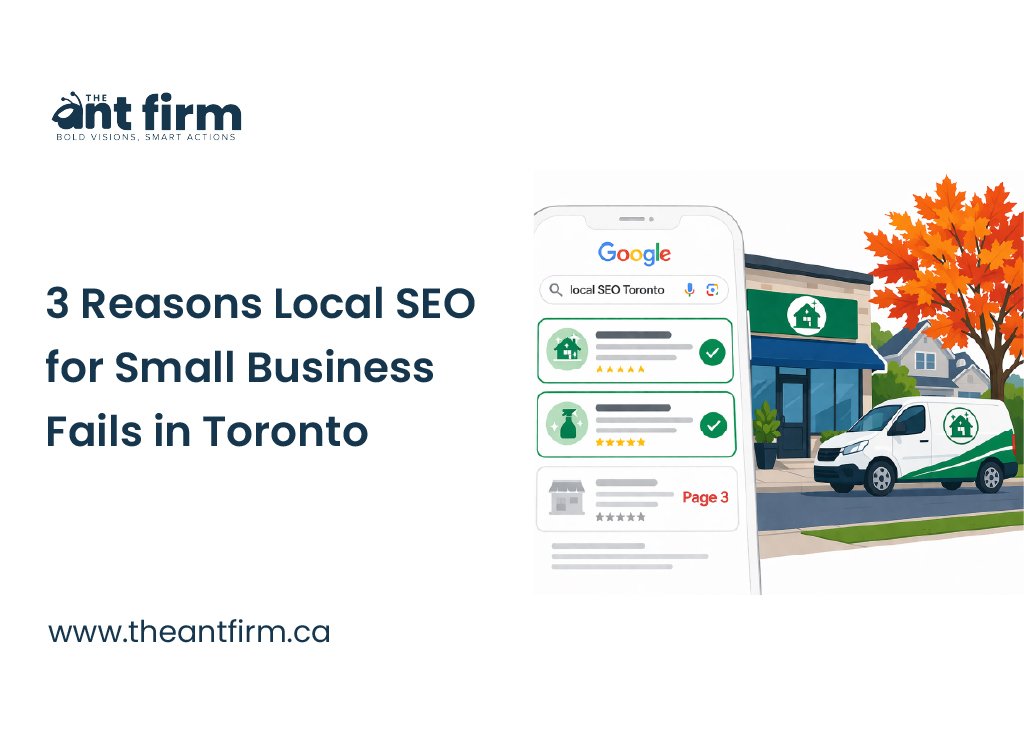
Local SEO for small business decides if a Toronto customer searching for your service and area finds you or a competitor. That search can decide who gets the call when someone needs help nearby.
You may run a cleaning company in Scarborough, a plumbing shop in Etobicoke, a dental clinic in North York, or a gym in downtown Toronto. Your website looks fine, but the phone barely rings. The only people finding you already know your name.
The problem may be how your website is set up. Three fixes can help: create a page for each service, mention the neighbourhoods you serve, and keep your Google Business Profile consistent with your website.
So, what does local SEO actually cover?
What Local SEO for Small Business Actually Means
Local SEO helps people in your area find your business when they search on Google. It can help your business appear in Google Maps, local search results, and regular search results.
Google looks at information from your website, business profile, reviews, directories, and other websites to understand what you offer and where you serve customers.
For example, a plumber in Scarborough wants to appear when someone nearby searches for “plumber in Scarborough.”
Here are the main places where local SEO happens:
| Part | Where it appears | What it tells Google | What you need to do |
|---|---|---|---|
| Google Business Profile | Google Search and Maps | Your name, address, phone, hours, category, and services | Keep your profile complete and up to date |
| Website pages | Your website | Your services, location, and business details | Create clear service and location pages |
| Reviews | Google and other review sites | What customers say about your business | Ask real customers for reviews and respond to them |
| Business listings | Yelp, Yellow Pages, and other directories | Your basic business information | Keep your name, address, and phone number accurate |
| Local links | Other websites | Your connection to the local area or industry | Earn links from relevant local websites and organisations |
| Service areas | Your website and Business Profile | Where you actually serve customers | List the areas you genuinely cover |
How Google Decides Which Local Businesses to Show
Google uses three main things to decide which local businesses appear in search: relevance, distance, and prominence. These are the factors Google lists in its local ranking guidance.
| Factor | What it means | What Google looks at | What you can work on |
|---|---|---|---|
| Relevance | How closely your business matches the search | Your services, business category, website content, and business profile | Keep your services, pages, and business information clear |
| Distance | How close your business is to the searcher | Your business location and where the search is coming from | Your physical location |
| Prominence | How established your business is online | Reviews, links from other websites, and information about your business | Reviews, local mentions, useful content, and relevant links |
Relevance helps Google understand your business. If you are a plumber in Scarborough, clearly list your services and service areas. Using the same keyword again and again is not enough. Your page should clearly explain what you do and where you work.
Distance is straightforward. A plumber in Scarborough is closer to someone searching in Scarborough than someone searching from Etobicoke. You cannot change your physical location through SEO.
Prominence builds over time. Reviews from real customers, links from relevant websites, and mentions of your business can all help Google see that your business has an established presence.
Why Most Toronto Small Business Websites Do Not Rank
Three problems keep a website from matching local searches. Each one hurts relevance. Here they are.
1. No Local Page Structure
Someone searching for hardwood floor installation in Etobicoke needs a page about that service. A person looking for deep cleaning in Downtown Toronto needs a page about deep cleaning. One general services page cannot target both searches well.
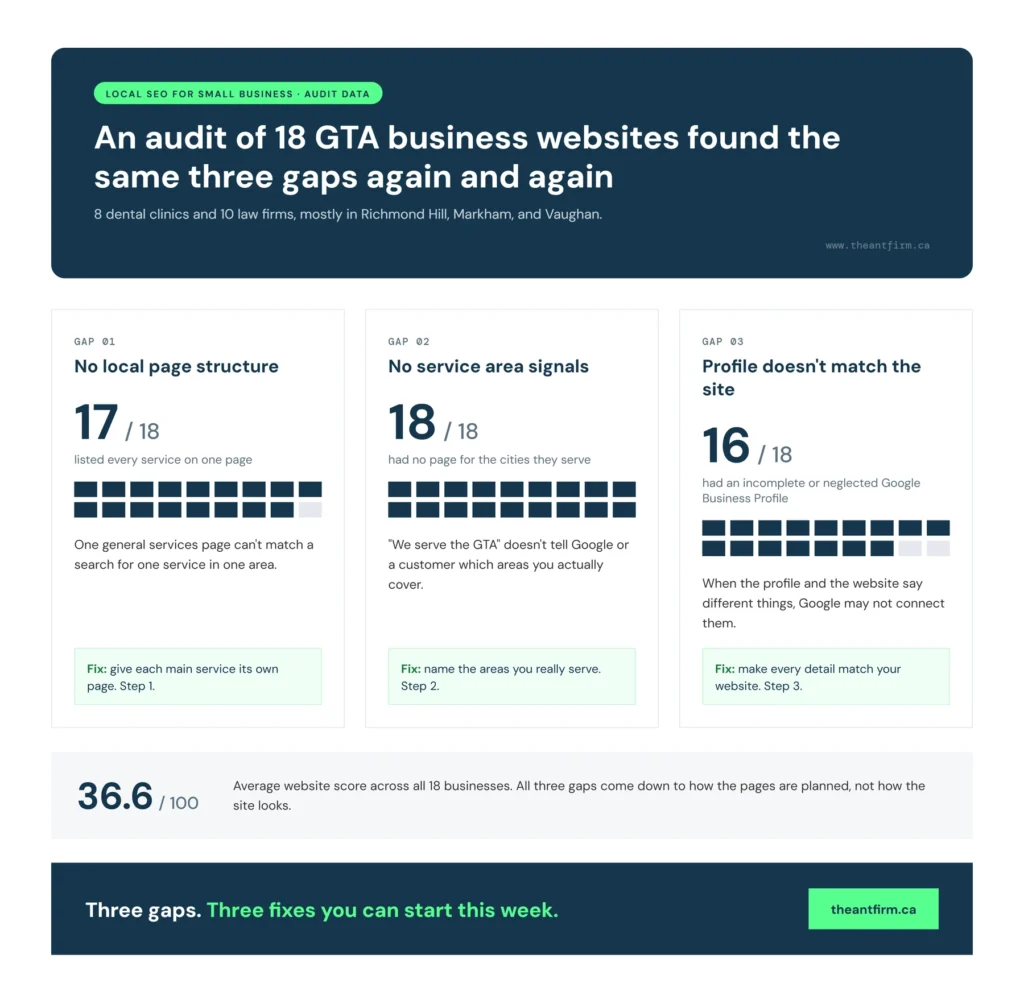
An audit of 18 GTA businesses found this problem often. The group included 8 dental clinics and 10 law firms, mainly in Richmond Hill, Markham, and Vaughan. The average website score was 36.6 out of 100. None had separate pages for the cities they served, and 17 listed all their services on one page. Read the full audit for more details.
Cleaning Experts Toronto has a separate page for each service. You can see an example on its Toronto web design page.
Check your website. If all services are on one page, create a separate page for each main service.
2. No Service Area Signals
Be clear about the areas your business serves. Saying “we serve the GTA” is too broad for Google and does not tell customers if you work in their area.
The audit of 18 GTA businesses found that none had separate pages for the cities they served. If you work in several areas, create a page for each important location. A plumber serving Scarborough can have a Scarborough page, while a clinic serving Vaughan can have a Vaughan page. Want to see one? Here is a live page for web design in Scarborough.
Make each page useful. Explain your services, the areas you cover, and any details customers need to know. Only list locations where you actually provide services.
That is Step 2 for improving local SEO for small business.
3. Your Google Business Profile Does Not Match Your Site
Your Google Business Profile and website should have the same basic information. Keep your business name, phone number, services, address, hours, and service areas consistent.
For example, if your Google profile says “Ace Drain Repair” but your website says “Ace Plumbing,” Google may not connect them correctly.
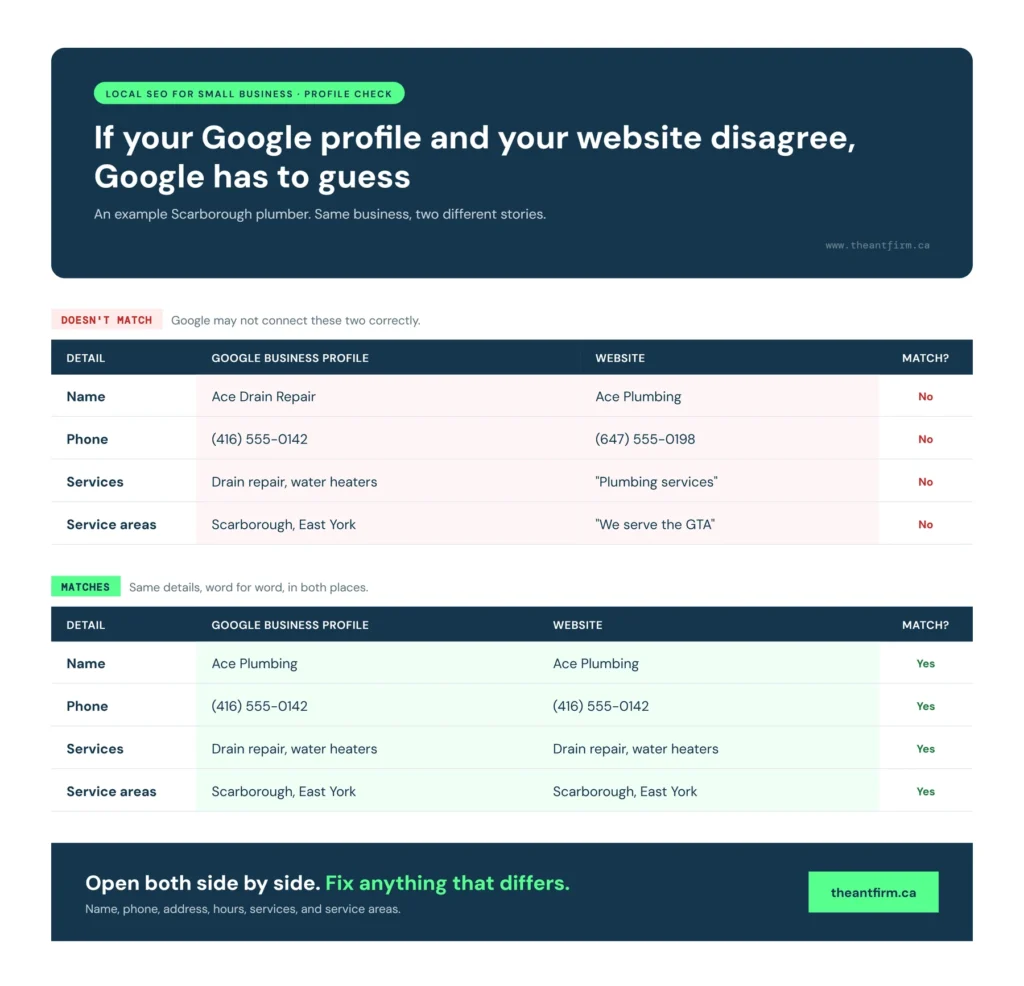
The audit found that 16 of 18 businesses had incomplete or neglected profiles. Check your details and update anything that is old or different.
That is Step 3.
The Toronto Neighbourhood Problem Most People Ignore
A local business can serve Toronto as a whole, but customers usually search for services in the part of the city where they live or work.
Toronto Is Not One Market It Is Many
Toronto has many neighbourhoods, and people often search for businesses close to where they live or work. A plumber in Scarborough may serve homes near Kennedy station. A physiotherapist in North York may work around Yonge and Sheppard. A cleaner in Liberty Village may serve condos along King West.
Google looks at how far a business is from the person searching. Mentioning your service area on your website helps Google understand where you work, but it does not change your physical location.
How to Mention Neighbourhoods Naturally
Use places that local people know, such as streets, stations, and landmarks. A plumber in Etobicoke could mention Kipling station and the Queensway. A physiotherapist in North York could mention Finch station and Sheppard Avenue.
Do not add a long list of neighbourhoods just for SEO. Keep the wording natural and useful.
Before: We provide plumbing services across Toronto.
After: We fix leaking taps and burst pipes near Kennedy Station and Lawrence East.
The second example tells people what the business does and where it works.
What to Fix, Step by Step
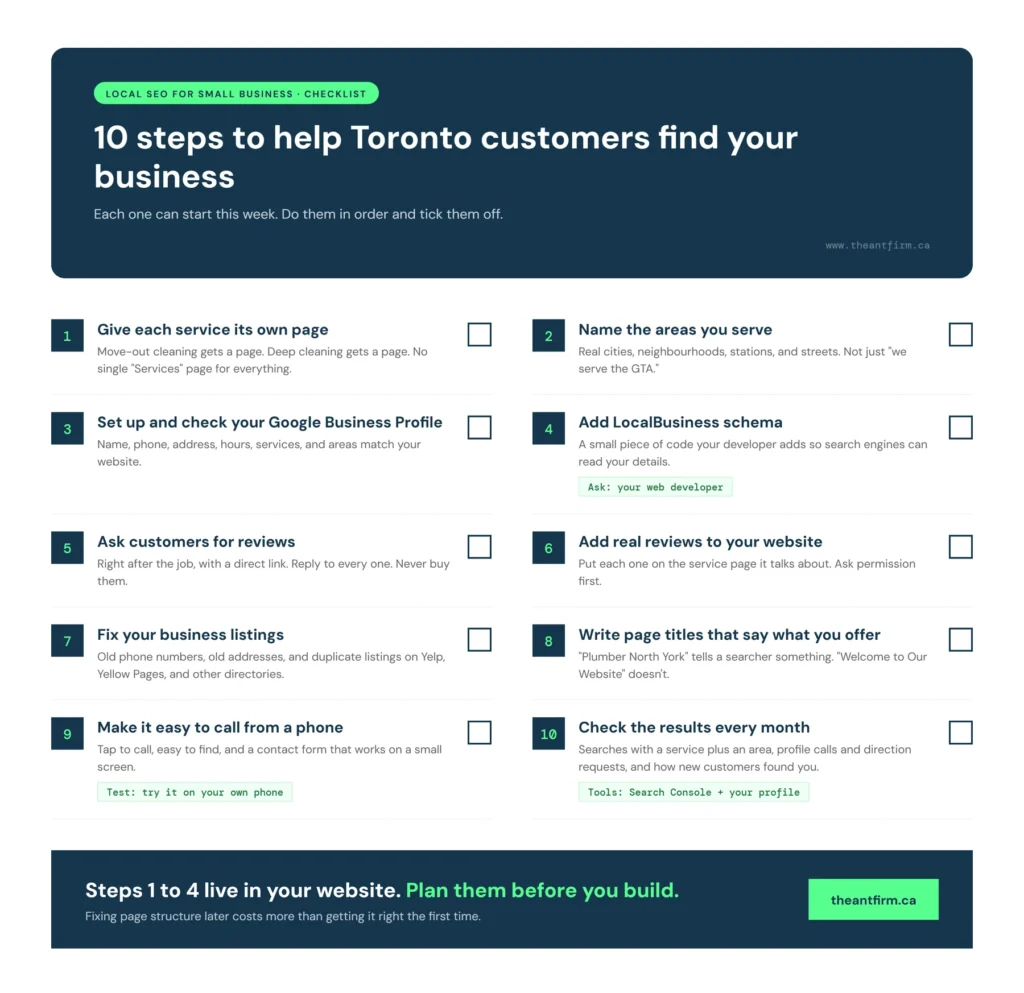
Local SEO for small business comes down to ten steps. Each one can start this week. Do them in order.
Step 1: Give Each Service Its Own Page
Start with your main services. Give each one its own page rather than putting everything under one services page. If you offer move-out cleaning in Scarborough, create a page for Move Out Cleaning Scarborough.
Use the page to explain what the service includes, what the job covers, how the process works, and how customers can contact you. Keep the page focused on that service. A person searching for move-out cleaning should not have to read through pages about office cleaning, carpet cleaning, and other services first.
Step 2: Name the Areas You Serve
Make a list of the places where you actually provide your services. Add the important cities and neighbourhoods to your website.
You can mention a nearby street, station, or landmark when it helps explain the area. For example, a plumber in Scarborough could mention Kennedy Station or Lawrence East if those are areas they serve.
Avoid writing “we serve the GTA” and leaving it at that. Customers search for specific places, and clear location information gives both customers and Google a better idea of where you work.
Step 3: Set Up and Check Your Google Business Profile
Claim and verify your Google Business Profile if you have not already done so. Then check every detail.
Your business name, phone number, address, opening hours, services, and service areas should match your website. If your website says Ace Plumbing but your profile says Ace Drain Repair, fix the difference.
Also choose the business category that best describes what you do. Keep your profile updated when your hours, services, or other important details change.
Step 4: Add LocalBusiness Schema
Ask your web developer to add LocalBusiness schema to your website. This is a small piece of code that gives search engines details about your business in a format they can read.
It can include information such as your business name, address, phone number, opening hours, and business type. You do not need to work with the code yourself. Your developer can add it and check that it is set up correctly.
Step 5: Ask Customers for Reviews
After finishing a job, ask happy customers to leave a Google review. Make it easy by sending them a direct review link.
Do not wait months to ask. A simple message after the work is finished is enough.
Reply to the reviews you receive as well. Thank the customer and respond to anything they mention. Keep the reply natural rather than repeating the same message every time.
Never buy reviews or ask people who have not used your service to write them. Reviews should come from real customers.
Step 6: Add Real Reviews to Your Website
Your Google reviews do not have to stay on Google. With permission, you can use genuine customer comments on your website too.
Place relevant reviews on the service pages they relate to. A customer talking about your move out cleaning service is useful on that service page.
The audit of 18 GTA businesses found that 16 had no customer reviews on their websites. Adding real feedback can give visitors more information before they decide to call.
Always use the customer’s actual words. Ask before publishing their name or other personal details.
Step 7: Fix Your Business Listings
Search for your business name online. Check sites such as Yelp, Yellow Pages, and other directories where your business is listed.
Look for old phone numbers, previous addresses, incorrect business names, or outdated opening hours. Fix the information where you can.
Try to keep your core business details consistent across these listings. This also gives you a chance to find duplicate or abandoned listings that may need attention.
Step 8: Write Page Titles That Tell People What You Offer
Your page title should make the service and location clear when both are important.
For example, “Plumber North York” tells a searcher what the page is about. “Welcome to Our Website” tells them almost nothing.
Do not add every city you serve to one title. Keep it short and relevant to the page. If the page is about plumbing in North York, make North York part of the title.
Step 9: Make It Easy to Call From a Phone
A local customer may visit your website because they need help right away. Do not make them search for your phone number.
Put the number somewhere easy to find and make it tap to call on mobile. Your contact form should also work properly on a small screen.
Test this yourself. Open your website on your phone and try to contact the business as if you were a new customer. If you have to scroll through several pages to find the number, fix it.
Step 10: Check the Results Every Month
Local SEO takes time, so check your numbers regularly rather than judging the work after a few days.
Use Google Search Console to see which searches are bringing impressions to your pages. Look for searches that include both a service and location, such as plumber Scarborough.
Check your Google Business Profile for calls and direction requests. Keep your own record of calls, quote requests, and form submissions too. When a new customer contacts you, ask how they found the business and note the answer.
Write the numbers down each month. Then compare them over time. You will have a much clearer idea of which pages and local SEO work are bringing people to your business.
FAQ
Does a small business in Toronto need local SEO?
Yes. Local SEO helps people nearby find your business when they search for a service. It can help plumbers, cleaners, dentists, and other local businesses appear in relevant searches.
What is the difference between local SEO and regular SEO?
Regular SEO helps your website appear in search results. Local SEO also looks at where your business and customers are located. You cannot control the distance, but you can keep your website and business details clear and accurate.
Do I need a Google Business Profile?
Yes. A Google Business Profile helps your business appear on Google Search and Maps. Keep your business name, phone number, address, hours, and services up to date. These details should also match your website.
Can I do local SEO myself?
Yes. You can update your Google Business Profile, ask customers for reviews, update your website, and keep your business listings accurate. Technical tasks such as schema may need a developer.
How long does local SEO take?
Local SEO takes time. Results depend on your website, competition, location, reviews, and current SEO work. Check your website traffic, calls, and Google Business Profile activity to track progress.
Ready for a Simple Fix
A local business website needs the right pages from the start. Each service should have its own page, your service areas should be clear, and your Google Business Profile should match your website. Adding keywords or plugins will not fix poor site structure.
A website from The Ant Firm costs a flat $2,000, one time. The package includes service pages, neighbourhood pages, LocalBusiness schema, Google Business Profile setup, and Search Console connection. You own the WordPress site.
Learn more about the $2,000 flat-rate build on the Toronto web design page.