
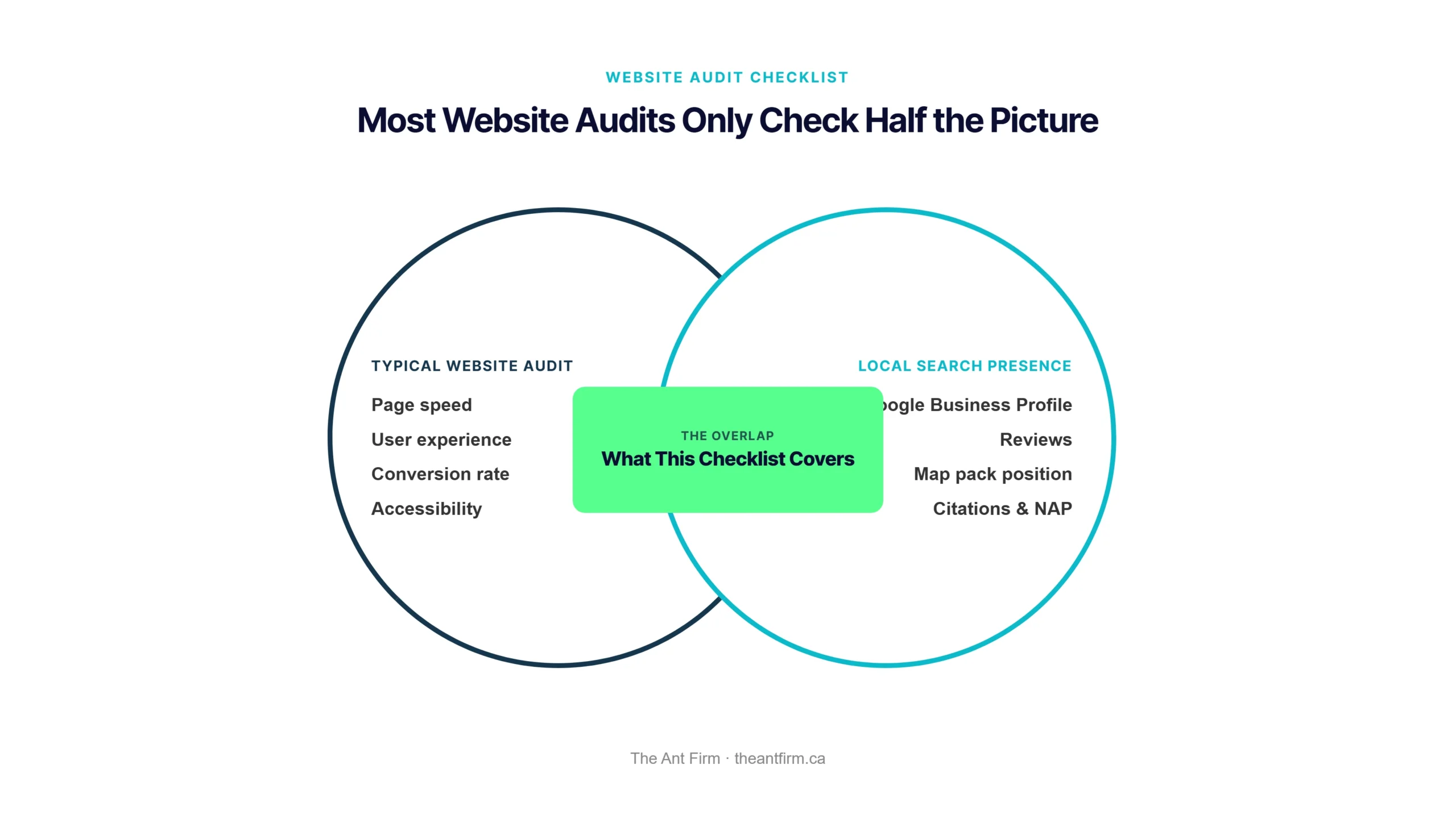
Quick note before we start: every “website audit checklist” you’ll find online treats your site as a standalone technical asset — page speed, user experience, accessibility, conversion rate, checked completely separately from anything to do with local search. For a local service business, that split is the actual problem. Your site can pass every technical check on this page and still lose every local job, because the thing costing you calls was never on those checklists: a stale Google Business Profile, a dead review streak, a map pack spot you don’t hold. This checklist covers both halves in one pass, because Google decides who shows up locally using your site, your profile, and your reviews together.
Quick Answer
- A fast, clean site can still lose every local job if your Google Business Profile is stale — check both, not just one.
- Map pack position and organic ranking are different things. Check both in an incognito tab before assuming your site is the problem.
- Review recency matters more than your average rating. A 4.8 average with nothing posted in eight months reads as “might be closed.”
- NAP consistency — your name, address, and phone matching exactly across every directory — is one of the most common invisible ranking blockers.
- Testing your own contact form on a real phone catches lead-loss bugs no SEO tool will ever flag.
- The goal isn’t fixing all 10 items today — it’s finding the 1-2 that are actually costing you calls this month.
The Website Audit Checklist Most Guides Get Wrong
Every small business website checklist you’ll find covers the same five things. None of them cover the three that actually matter for a local service business.
Search for any website audit checklist and you’ll get the same five buckets every time: page speed, user experience, accessibility, content, and conversion rate optimization. All useful. All completely silent on Google Business Profile, review recency, and local pack position — the three signals that decide whether a plumber, electrician, or clinic actually shows up when someone nearby searches for them. A generic checklist treats “website” and “local search presence” as two unrelated projects. For a local business, they’re the same project, judged by the same algorithm.
Check 1: Check Your Real Local Rankings First
Before you touch a single line of your website, find out where you actually stand — this decides which of the next nine checks matter most.
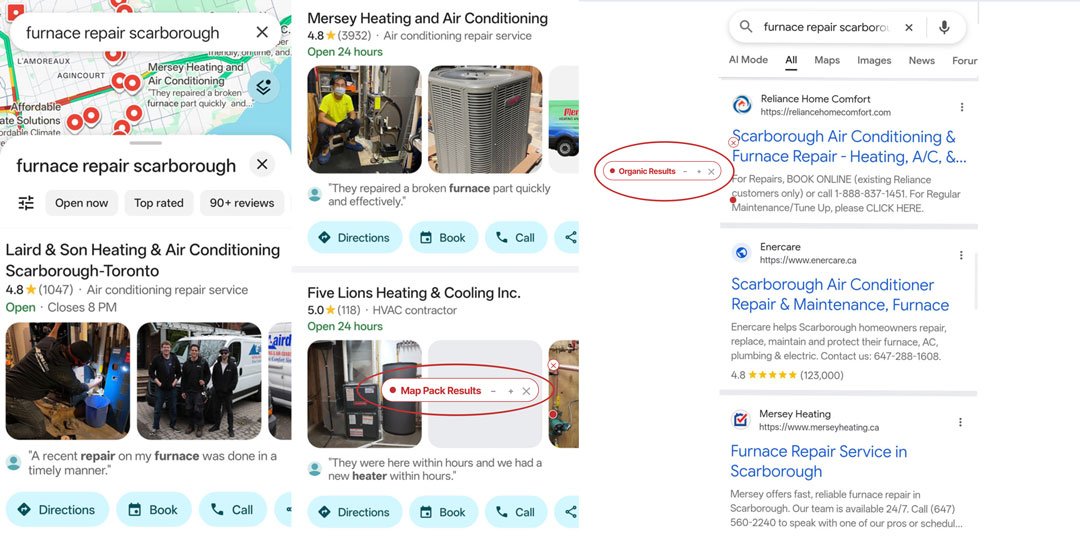
Open an incognito browser tab on your phone and search your exact service plus neighbourhood — “furnace repair Scarborough,” not just “furnace repair.” Two different things can be true at once: you can rank fine in the plain organic results below the map and still be invisible in the 3-pack map results at the top, which is where most local searches actually convert. Note both positions separately — they have different fixes.
My site ranks fine in Google. Why does it feel like I’m losing local jobs anyway?
Because organic ranking and map pack ranking aren’t the same signal. A site can be well-optimized and still sit outside the 3-pack if the Google Business Profile behind it is weak — which is exactly what Check 2 looks at.
While you’re at it, run the same search in ChatGPT or Perplexity. AI answer engines are becoming a second surface local customers use to find who to call, and most businesses have no idea whether they show up there at all. If you want that checked properly instead of guessing, our free AI Visibility Checker scores exactly this — crawler access, schema, and entity clarity — in under a minute.
Check 2: Audit Your Google Business Profile
This is the check almost every generic website audit skips entirely — and it’s often the whole problem.
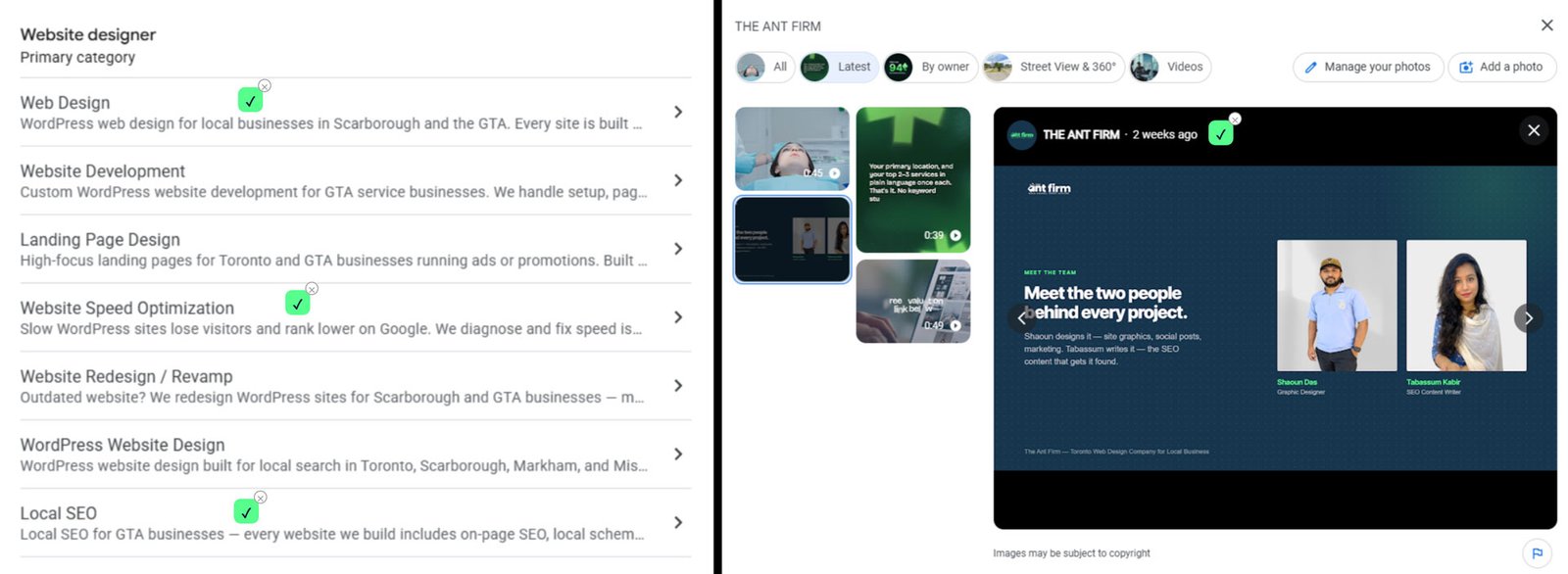
Open your profile and go through it like a stranger would: is the address, hours, and category still current? Is every service you actually offer listed individually, or bundled into one vague line? Has a photo been added in the last 90 days? Has there been a post in the last month? Each of these is a small thing on its own, but together they’re what tells Google — and a customer scrolling the map results — whether you’re an active, trustworthy business.
Key Insight
If this check alone turns up three or four gaps, that’s not a five-minute fix — that’s a real project. We’ve written a full, section-by-section guide to fixing exactly this: categories, services, photos, posts, and the settings that quietly cap your ranking. Read the Google Business Profile advanced guide →
Check 3: Look at Your Reviews Like a Stranger Would
Check four things: your average rating, how recently a review was posted, whether you’ve responded to any negative ones, and whether reviews actually mention the specific service performed rather than just “great job, thanks!” Recency carries more weight than most business owners assume.
Myth
“A high average rating means my reviews are fine.” Not on its own. A 4.8 average with nothing posted in eight months reads to both Google and a customer as “might not be in business anymore” — recency is doing work your star rating can’t do alone.
If you’re sitting on old five-star reviews and nothing new, the fix isn’t complicated: ask your last three happy customers directly, by text or email, for a two-line review mentioning what you fixed or built for them.
Check 4: Does Every Page Actually Mention Your Service Area?
Open your homepage and every service page, and check the first 100 words of visible copy — not the footer, the actual copy a visitor and Google both read first. Does it name your neighbourhood or city, or does it only live buried in the address block? A page that never mentions “Scarborough” or “the GTA” in its main copy is giving Google nothing to connect the page to a local search, no matter how good the service description is.
We’ve written more on what this actually looks like done well: the local business website structure guide breaks down the structure page by page, and our local SEO guide for small businesses covers the fundamentals if this check turns up gaps across most of your pages.
Check 5: On-Page Basics — Titles, Descriptions, and First Sentences
View the page source or use any free SEO browser extension to check: does the title tag actually describe the page and stay under about 60 characters? Is there a meta description at all? Does the H1 match what someone searching would expect to land on? And — increasingly important — does the very first sentence on the page directly answer the question a searcher typed in?
Why this last one matters now
AI Overviews and chat-based search pull direct answers from the top of a page, not the middle. A page that opens with a vague intro paragraph before getting to the point is invisible to that entire surface, even if it ranks fine in traditional blue links.
Check 6: Technical Health — Speed, Mobile, Broken Links
This is the one area every other website audit checklist already covers in depth — so we’ll keep it short.
Run your homepage and one service page through Google PageSpeed Insights on the mobile setting. Use any free broken-link crawler to catch 404s. Then do the one check tools can’t do for you: open your site on an actual phone, not a browser dev-tools simulator, and tap through the call button and the contact form yourself.
Check 7: Citation and NAP Consistency Check
Pull up your listing on Google, Facebook, Yelp, and at least one industry-specific directory, side by side. Your business name, address, and phone number (your “NAP”) need to match exactly across all of them — same suite number, same phone format, same spelling.
Myth
“A small mismatch like a missing suite number doesn’t matter.” It’s one of the most common invisible local-ranking blockers precisely because it looks harmless. Google cross-references these listings to confirm you’re a real, consistent business — small mismatches quietly weaken that confirmation.
Check 8: Benchmark Against Your Top 3 Local Competitors
Search your main service plus city term, open whoever ranks in positions 1 through 3, and compare directly — not on gut feel, on specifics.
| What to Compare | What You’re Looking For |
|---|---|
| Review count | How many more (or fewer) they have than you |
| Service pages | Do they have a dedicated page per service, or one general page like yours? |
| Photos | Recency and quantity on their Google profile |
| Load speed | Run their homepage through PageSpeed too — is it actually faster than yours? |
This turns a vague feeling of “they’re beating us” into a short, specific list of real gaps — which is far more useful than guessing.
Check 9: Test Your Own Conversion Path Like a Customer
On your actual phone, tap the click-to-call button and confirm it dials correctly. Then submit your own contact form with a real (or clearly marked test) entry, and check two things: does the on-screen confirmation message actually appear, and does a lead notification arrive in your inbox within a few minutes? A broken form fails silently — no error message, no crash, just a lead that vanished with nobody noticing for weeks.
We wrote a full breakdown of the ways this quietly happens in why your site isn’t converting visitors into calls — worth a read if this check turns up anything.
Check 10: Turn Your Findings Into a Priority List, Not a To-Do Avalanche
This is the step every generic audit checklist skips, and it’s the one that actually decides what you do next.
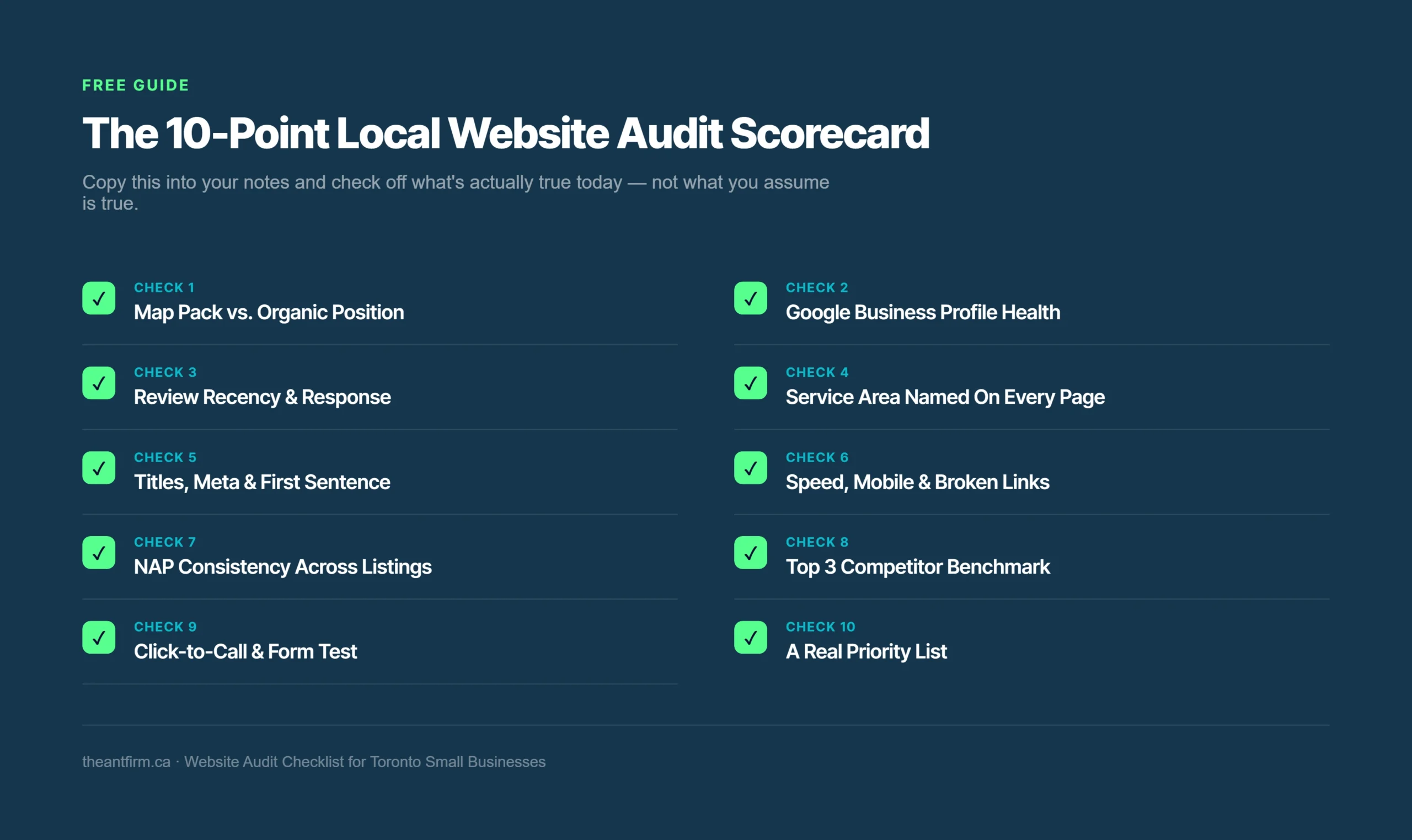
Go back through your notes from the nine checks above and circle only the 2-3 items directly connected to lost calls — usually your Google Business Profile, your reviews, or one specific technical fix. Ignore the rest for now. Trying to fix all ten at once is how audits turn into a list that never gets finished.
The Honest Question to Ask
If your circled list is short — a stale GBP field, a missing review ask, one broken form — fix it yourself this week. If the honest list is longer than that, and it keeps coming back to the site’s actual structure rather than its settings, that’s a different kind of fix.
Frequently Asked Questions
What is a website audit checklist?
A website audit checklist is a structured review of everything affecting how your site performs for search engines and real visitors. For a local business, that has to include your Google Business Profile and local pack position, too — a site-only audit is an incomplete one.
How often should you audit your website?
Quarterly, if you’re actively marketing a local business. Don’t wait for the quarterly check, though, if you notice a sudden ranking drop, a Google Business Profile change or suspension, or a move to a new service area — audit right away instead.
How much does a website audit cost?
Agencies commonly charge somewhere between $500 and $5,000 for a standalone audit, depending on scope. Our $2,000 flat-fee website build folds the audit into the fix itself, so you’re not paying for an audit and then paying again separately for the rebuild it recommends.
That’s the full website audit checklist — most of it free and fully DIY. The last question is the one that actually matters.
If the Honest List Is Longer Than 2-3 Items, Settings Aren’t the Problem
A stale GBP field or one broken form is a this-week fix. A site that keeps failing the same checks quarter after quarter needs its structure rebuilt, not another patch. We build local-first websites with SEO, GBP, and local schema wired in from day one — a $2,000 flat fee, one project, not a checklist you re-run every three months.