

TLDR
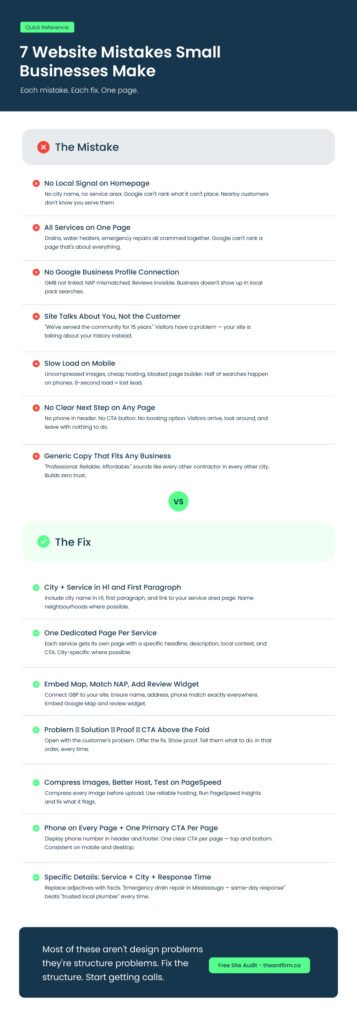
The most common website mistakes small businesses make include no local signal on the homepage, having all services on one page, not connecting Google Business Profile, homepage copy that focuses on the company instead of the customer’s problem, slow mobile loading, no clear next step on any page, and generic copy that could belong to any business. Most of these are not design problems but structure problems.
Introduction
Getting calls or leads from small business website has become a challenge. You invested in a professional design, spent money to get it online, and even shared it with friends, yet your phone stays quiet. The reason your website isn’t working is often not the design but the structure.
Websites often fail because of common website mistakes small business owners make. These include unclear service pages, missing local signals, weak calls-to-action, and generic content that does not connect with visitors.
Google and potential customers need to understand what your business does, where you operate, and how to take the next step. Without this clarity, your site will stay invisible or unhelpful, no matter how good it looks.
In this blog, you will learn the most common website mistakes small business websites make and practical ways to fix them. You will see how improving structure, content, and local signals can help your website attract visitors, build trust, and turn clicks into real leads.
So, let’s begin the discussion with what you should include on a small business website.
What to Include in a Small Business Website
Have a look at the elements that you should include in a small business website:
- Clear Homepage: Tell visitors what you do, who you help, and where you operate. Add a simple, strong call-to-action.
- Service Pages: Give each service its own page with clear details, examples, and the areas you cover.
- About Page: Share your story and experience. Let visitors know why they can trust you.
- Contact Info: Make your phone number, email, and address easy to find. Include a contact form and a map.
- Local Details: Mention cities, neighborhoods, or landmarks so visitors know you serve their area.
- Calls-to-Action: Guide visitors on what to do next, whether it’s calling, booking, or requesting a quote.
- Reviews or Testimonials: Show customer feedback to build trust.
- Mobile-Friendly Design: Make sure your site loads quickly and looks good on phones and tablets.
- Good Visuals: Use images or videos to support your content without slowing the site.
- Basic SEO: Use relevant keywords, headings, and meta descriptions so Google understands your business.
- Privacy Info: Include privacy policy, terms, or cookie notices if needed.
Why Structure Matters for Small Business Websites
Many small business owners focus on how a website looks instead of how it works. A site can look good but still fail to bring in customers if it is built the wrong way. Visitors need to know quickly what the business does, where it operates, and how to get help. Google also uses the structure of your pages to decide which websites to show in search results.
When a website is not structured well, it cannot deliver results even if it looks attractive. Pages that mix different services or do not show the location clearly confuse visitors and search engines. For local contractors, a clear structure can turn a quiet website into one that brings calls every week.
6 Reasons Structure Matters:
- Helps Local Customers Find You: Adding city and neighborhood details makes it easier for nearby customers to see your business.
- Makes Services Clear: Separate pages for each service help visitors quickly find what they need.
- Guides Visitors to Take Action: Clear calls-to-action show visitors what to do next whether it is calling or booking an estimate.
- Improves Search Engine Ranking: Search engines understand well-organized pages better, which can increase your ranking.
- Keeps Visitors on Your Site: Organized content helps visitors stay longer and explore more.
- Makes It Easier to Improve: Structured pages make it easier to see how visitors behave and make improvements that bring results.
7 Common Website Mistakes Small Businesses Make
Here, you wll learn about top 7 common website misales small business make. So, the mistakes are:
Mistake #1: No Local Signal on the Homepage
One of the common website mistakes small business owners make is not showing where they serve. Mike’s homepage does not mention Toronto. Google cannot rank a business if it does not know its location. Without this local signal, the website remains invisible to nearby customers.
Many websites use generic text. They describe services but leave out the city or neighborhoods served. A visitor from Toronto might not realize Mike serves their area.
Fix: Include your city and service area in the H1 and first paragraph. For example, “Emergency Plumbing Services in Toronto” informs both visitors and Google where you operate. Linking to a page about your service area reinforces this. Mentioning neighborhood names and local landmarks can also improve trust and search visibility.
Internal link: website built for your service area
Mistake #2: One Page for Every Service
Many small businesses place all their services on a single page. Drains, water heaters, emergency repairs all appear under “Services.” Google struggles to rank pages with mixed content and visitors become overwhelmed.
Visitors need clear, focused information. If someone searches for water heater repair, they do not want to scroll through a long services page with unrelated information. This setup often results in lost leads.
Fix: Create a separate page for each service. Include city-specific details. For example, “Water Heater Installation in Toronto” ranks better than a generic “Services” page. Each page should have a headline, service description, local context, and a call-to-action. This structure adjustment increases leads significantly.
Mistake #3: No Google Business Profile Connection
A missing or incorrect Google Business Profile is a common mistake small business owners make. If your NAP (Name, Address, Phone) does not match, reviews are hidden, or maps are not embedded, your site will not appear in local searches.
Google uses business profiles to show your company in the local pack. Without it, a well-structured site can remain unseen. Reviews and accurate information improve credibility and ranking.
Fix: Connect your Google Business Profile to your website. Embed the map, ensure your NAP matches exactly, and add a review widget. For GTA contractors, this can decide if the business appears in local searches.
Mistake #4: The Site Talks About You, Not Them
Many sites start with “We have served the community for 15 years.” Visitors do not care about your history yet; they have a problem that needs solving. Focusing on the company instead of the customer is a common small business mistake.
Visitors decide in seconds if your site is relevant. If the homepage talks only about your experience without addressing their issue, they leave. Clear messaging that highlights the problem and solution keeps people engaged.
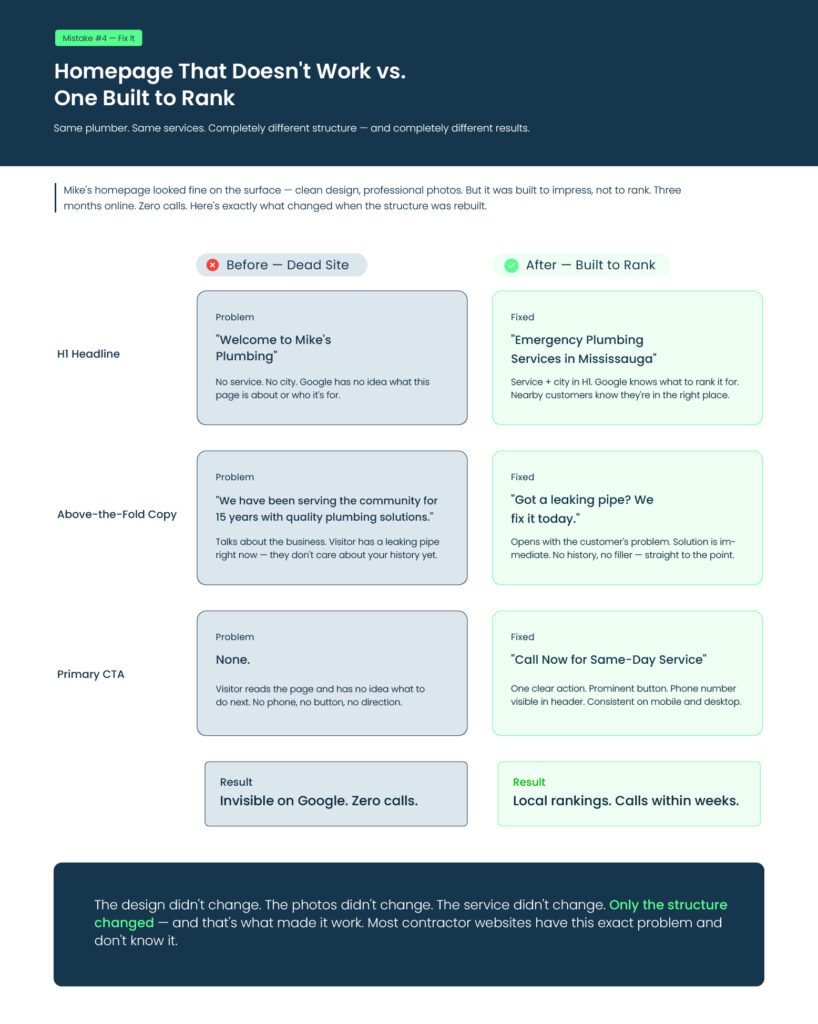
Fix: Rewrite above-the-fold copy to start with the customer’s problem, offer the solution, provide proof, and include a call-to-action. For example, “Leaking pipe? Our Toronto team provides same-day emergency plumbing. Call now for fast service.”
Let’s check the result here
| Element | Before | After |
| Headline | “Welcome to Mike’s Plumbing” | “Emergency Plumbing Services in Toronto” |
| Above-the-Fold Copy | “We have 15 years of experience” | “Got a leaking pipe? We fix it today” |
| CTA | None | “Call Now for Same-Day Service” |
Mistake #5: Slow Load, Especially on Mobile
Website speed affects visitor behavior. Uncompressed images, cheap hosting, or bloated page builders slow sites. Half of contractor searches happen on mobile, and a six-second load time makes visitors leave.
Slow websites frustrate visitors and increase bounce rates. Even an attractive design cannot hold attention if pages load slowly.
Fix: Compress images, use a reliable host, and test load times on PageSpeed Insights. Prioritize mobile performance. Remove unnecessary scripts and avoid heavy page builders.
Mistake #6: No Clear Next Step on Any Page
A website without a clear next step loses visitors. No phone in the header, no CTA at the bottom, no booking button. Visitors arrive and leave unsure what to do.
Visitors need direction. Lack of guidance reduces calls, emails, or inquiries.
Fix: Display your phone number on every page. Add one primary CTA per page. Ensure mobile and desktop views are consistent. Example: “Book a Free Estimate Today” button at the top and bottom of service pages. Use noticeable colors to make buttons more attractive.
Mistake #7: Generic Copy That Could Belong to Anyone
“Professional, reliable, affordable” does not inform visitors. Generic copy is a common small business mistake that reduces trust.
Visitors need details. They want to know exactly what you do and where. Generic adjectives do not set your business apart.
Visitors also want to hear your voice, not a line they have already read on ten other sites. When your message feels the same as everyone else’s, people move on because nothing grabs their attention.
Clear, specific language shows confidence and helps people feel they are in the right place. The more real and direct your words are, the easier it is for visitors to trust you and take the next step.
Fix: Use specific, local examples. For example, “Emergency drain repair in Toronto — same-day response” is more persuasive than vague adjectives. Highlight actual services and locations, mention response times, and include testimonials when possible.
FAQ
What are the most common website mistakes small businesses make?
The most common website mistakes small businesses make are structural, not cosmetic. They include missing local signals, putting all services on one page, not connecting Google Business Profile, and using generic copy that does not show visitors what the business does, where it operates, or why to call. Adjusting the structure is often enough to get leads without redesigning.
Why is my small business website not getting any leads?
Your website may not have a clear service area for local SEO, dedicated pages per service, visible phone numbers and calls-to-action on every page, or fast mobile load times. A site can look fine but fail if it is not structured to rank for local searches and guide visitors to take action.
What website mistakes should I avoid when starting a business?
When starting a business, avoid building a single-page or template site with no room to expand, skipping location-specific pages, using a free domain or subdomain, and failing to set up a Google Business Profile that matches your website exactly. These are the mistakes to avoid when starting a business.
How can I fix the common website mistakes small businesses make?
You can fix these mistakes by checking each page to make sure it is clear and easy to follow. Create a separate page for each service, include your city and areas you serve, connect your Google Business Profile, and write content that focuses on the visitor’s problem. Adding visible phone numbers and clear buttons for calling or booking makes it easier for people to take action.
Why does having separate service pages matter?
Having separate pages for each service helps visitors quickly find what they need. It also helps Google understand your services so your pages show up in local searches. Putting all services on one page can confuse visitors and make them leave without calling. Clear, focused pages make it easier to get leads and improve your website’s performance.
End Note
In the end, the common website mistakes small businesses make often come from unclear structure, weak local signals, and messages that do not connect with visitors. These issues may seem small but they affect whether people trust your business and reach out.
When every page clearly shows what you do, where you serve, and how to get in touch, your website starts working the way it should. A few simple updates can help your site earn trust, get noticed locally, and bring in real calls from potential customers.
Not sure which of these mistakes your site is making? Request a free website audit and we’ll show you what to fix first.