If you’ve already set up your Google Business Profile, you’ve done the first 20% of Google Business Profile optimization. Here’s the other 80% — the specific, tested changes to categories, services, photos, and posts that actually move your ranking and turn profile views into phone calls.
Quick note before we start: most “GBP tips” articles repeat the same generic advice — add photos, respond to reviews, keep hours updated. Everything below is different: it’s pulled from actual ranking tests on real businesses (Sterling Sky’s client experiments, Google’s own playbook data), so you know exactly what changed and what result it produced.
Quick Answer
- Categories are your #1 lever. Adding relevant secondary categories can lift keyword rankings 30%+ — most businesses only ever set one.
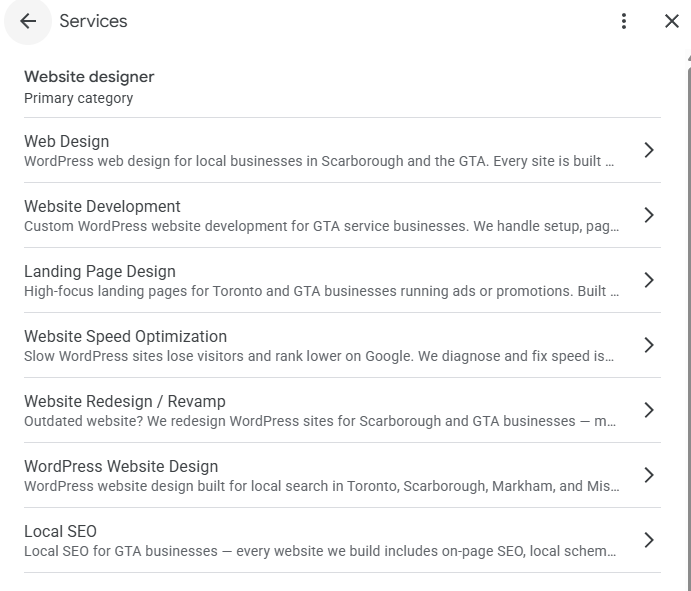
- The Services section is a ranking factor, not a directory listing. Add each service individually.
- Photo captions and video help Google’s AI understand — and rank — what you actually do.
- Google Posts should read like ads, not social updates — bottom-of-funnel, one clear offer, first 80 characters doing the work.
- The link from your GBP to your website should point to the exact service page, not your homepage — this alone is a measurable ranking factor.
- 24/7 hours + after-hours phone coverage can put you in front of searches your competitors are invisible to.
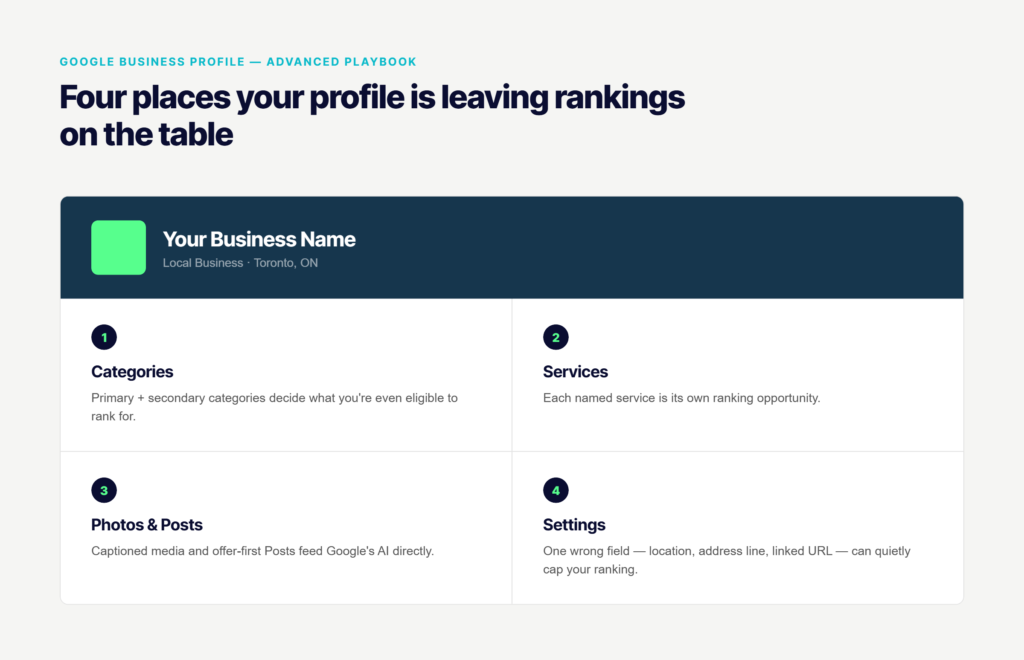
Google Business Profile Optimization Starts With Your Category
Before touching anything else on your profile, get this right — it controls your ranking eligibility.
Google determines whether your business is even eligible to rank for a search using one combination: your primary category plus your business name. A business named “KemKids Dance” with the primary category “Dance School” may rank well for “kids dance lessons” but disappear entirely for plain “dance lessons” — the name narrows what Google thinks you’re relevant for.
How many secondary categories should you actually add?
Most businesses set one category and stop. Should you add more?
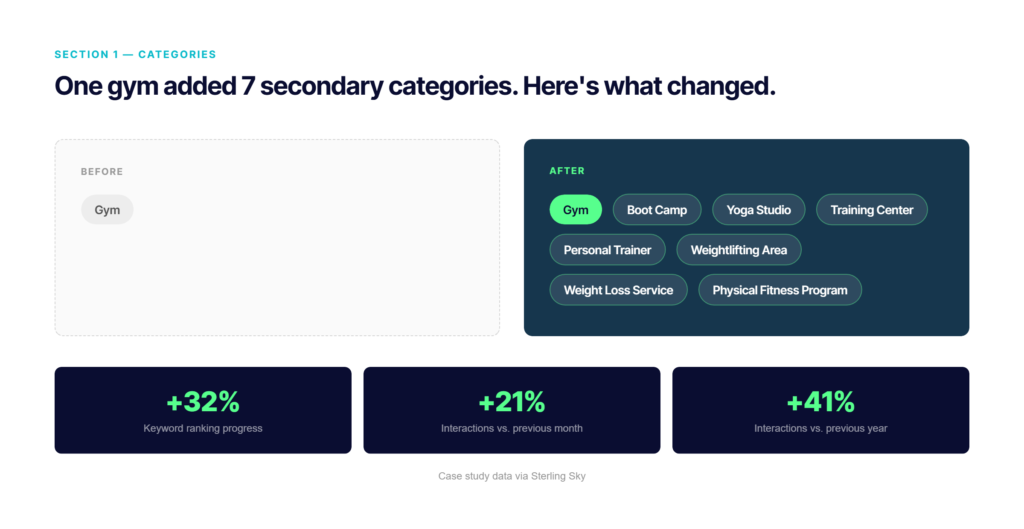
Yes — secondary categories open ranking opportunities your primary category can’t reach on its own. A gym that only listed “Gym” added 7 relevant secondary categories (Boot Camp, Yoga Studio, Training Center, Personal Trainer, Weightlifting Area, Weight Loss Service, Physical Fitness Program) and saw real, measurable gains.
| Metric | Change After Adding 7 Secondary Categories |
|---|---|
| Keyword ranking progress | +32% |
| Interactions vs. previous month | +21% |
| Interactions vs. previous year | +41% |
Myth
“One GBP can rank for all my services.” Not true. A single profile generally can’t dominate rankings across fundamentally different service categories. If you offer unrelated services, expect to rank strongly only in your primary category — or consider separate profiles for genuinely separate businesses.
Two more things to know before you touch your category settings: changing your primary category can trigger reverification — more likely if the change is drastic (plumber to restaurant) or your website content doesn’t match the new category. And business name keywords are still the #3 most powerful local ranking factor, but they cut both ways — a highly specific name can boost eligibility for that exact phrase while excluding you from broader category searches.
The Services Section Is a Ranking Factor — Not a Formality
Most businesses either skip this section or fill in three vague lines. Both are mistakes.
Sterling Sky ran ranking tests across law and medical businesses and found that adding specific, individual services to the GBP Services section produces measurable ranking improvements — for those exact terms. A generic law firm listing “Legal Services” doesn’t rank for “DUI litigation.” A law firm that adds “DUI Litigation” as its own service line does.
Key Insight
Key Insight
Match your service names to the exact phrases your customers search — not internal jargon. Each service you add is a separate ranking opportunity, so list every real service individually instead of bundling them into one line.
Give Google’s AI Something to Actually Read
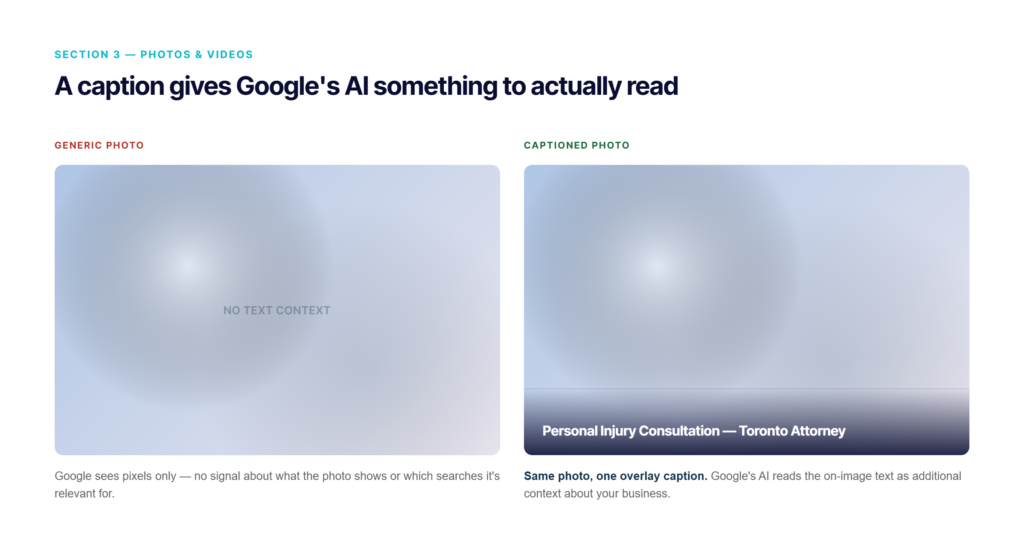
A generic photo tells Google nothing. A captioned one tells it exactly what you do and where.
Instead of uploading a plain photo, overlay a short, descriptive caption directly on the image — including a relevant keyword (e.g. “Personal Injury Consultation — Toronto Attorney” instead of a bare headshot). Google’s AI extracts that on-image text as additional context about what your business offers and which searches you’re relevant for.
Video beats photos — by a real margin
GBP videos consistently outperform static photos in both Posts and on the profile itself. The actual upload limit is 75MB file size — not the 30-second duration Google’s own help docs suggest. A video can run longer than 30 seconds as long as it stays under the file size cap.
Tip
GBP videos don’t autoplay with sound on Google Maps, so captions matter here too. Quick workaround: upload your video to Instagram or TikTok first (both auto-caption), then download the captioned version and upload that to GBP.
Stop Posting Like It’s Social Media
Google Posts show up in front of people who are actively searching your category — that’s high-intent ad space, not a place for casual updates.
Treat every Google Post as conversion advertising: a strong CTA, a specific offer, aimed at someone ready to buy right now — not a friendly update. Screenshotting a great review into a Post is one of the highest-converting formats, since it puts trust and offer in the same frame.
Source: Google’s own GBP playbook data (Crate & Barrel study)
The formatting rule that actually matters
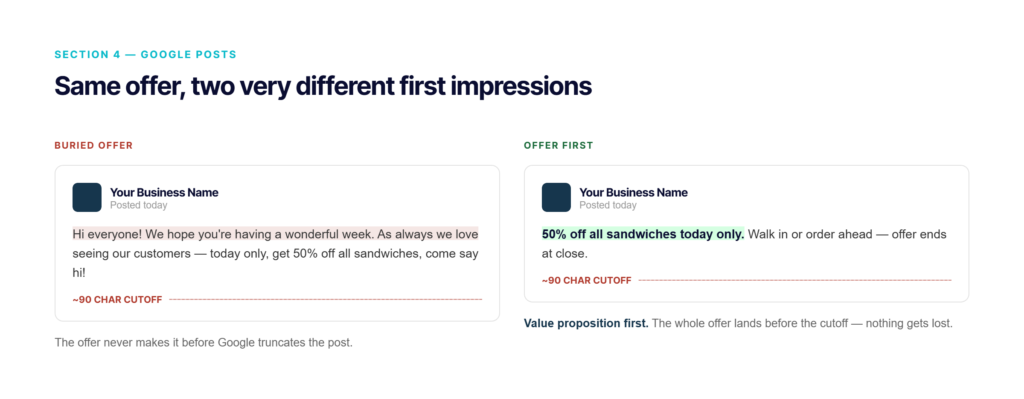
Google cuts post text after 80-100 characters. Put the value proposition first: “50% off sandwiches today”, not “Hi everyone, we hope you’re having a great day! Today we’re offering…”. If the offer isn’t in the first line, most readers never see it.
Tip
Offer and Event post types can now be set to repeat automatically — daily, weekly, or monthly. Set up a recurring weekly special once, and your profile always shows a freshly-dated post without you touching it again.
Your Description Won’t Boost Rankings — But It Still Does a Job
Myth
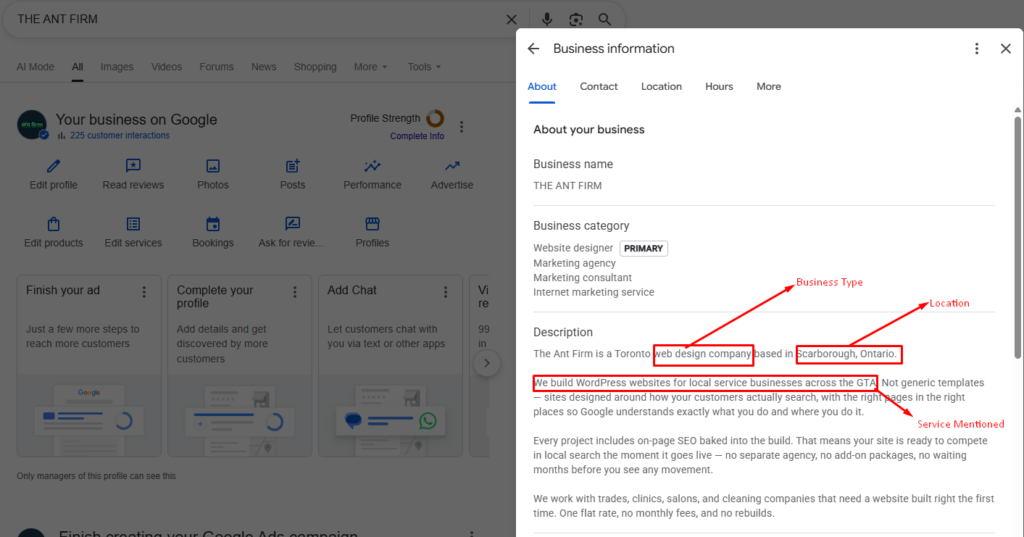
Keyword-stuffing your GBP description will not improve your map pack ranking — it’s not a ranking factor. But it increasingly shows up inside Google’s AI-generated answers, so it’s still worth writing well.
Write it for humans: what you do, how long you’ve been in business, what makes you different — mentioning your business type, location, and services once each is enough for Google’s AI to correctly associate you with them. Repeating keywords adds nothing and can read as spam.
Fill in the Description, Services, and Products sections completely, and keep Posts active — these are the fields Google’s AI draws from to answer questions in the “Ask a Question” feature on your profile. An incomplete profile means the AI has nothing to answer with.
Three Settings Quietly Killing Your Ranking
None of these are visible on your profile at a glance — check them before assuming your rankings are stuck for some other reason.
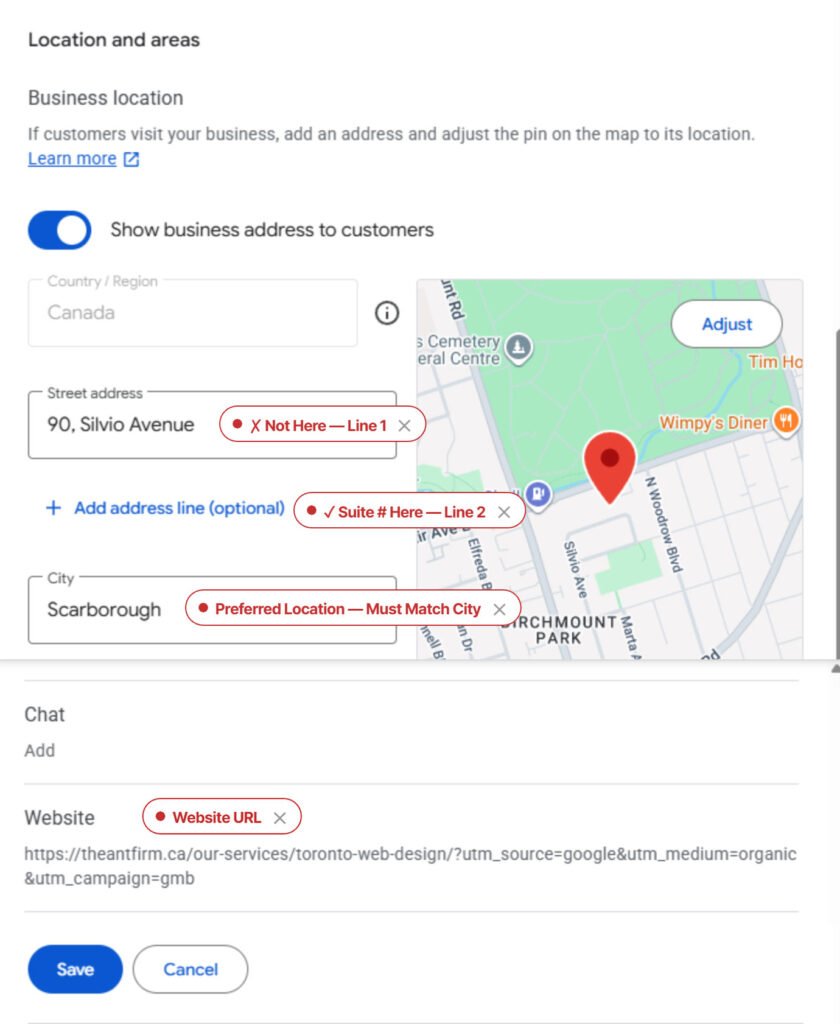
1. Preferred location must match your actual city
If your GBP “preferred location” setting doesn’t match the city in your physical address, you can drop 5-10 spots in that city’s local pack — regardless of how many reviews you have. This is a two-minute fix with an outsized effect.
2. Suite numbers belong in Address Line 2, never Line 1
Google reads Address Line 1 as a full street address. A suite or unit number entered there breaks its geocoding, which can place your map pin in the wrong spot entirely — and your map pin location is where Google ranks you from.
3. Link your GBP to the specific service page, not your homepage
Sterling Sky tested this directly with a law firm: switching the GBP website link from the homepage to a dedicated practice-area page produced an immediate ranking increase for that service’s searches. The more specific the landing page, the more relevant Google considers the listing for that exact service.
Hours That Capture Calls Your Competitors Miss
Setting your GBP hours to 24/7, backed by an actual after-hours answering service, filters your business into “open now” and “open 24 hours” searches that competitors with standard hours never appear in. Sterling Sky tested this with a landscaping company:
This only works if the after-hours calls actually get answered — the hours setting alone just gets you into the search; a real person (or answering service) converts the call.
The Free Audit Tool Google Already Gave You
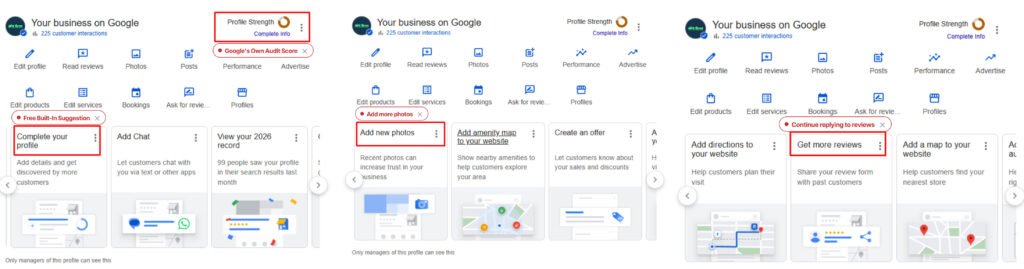
Open your GBP Insights section — Google explicitly tells you what to fix, with suggestions like “Add more photos,” “Add updates to your Profile,” or “Continue replying to reviews,” each benchmarked against similar businesses near you. Treat this as Google’s own optimization checklist and work through it before looking anywhere else.
This guide covers your profile itself. Reviews — velocity, filtering, generation, and reputation — are a big enough topic to get their own guide. That’s Part 3. A perfectly optimized profile still won’t save a website that doesn’t convert once people click through.
Your GBP Can Be Perfect and Still Lose You Customers
Everything above is free and fully DIY. But once someone clicks through from your optimized profile, your website is what closes the deal — or loses it. We build websites with SEO built in from day one, not bolted on after.
See How We Build Websites →