
Platform Comparison
Wix vs. Squarespace vs. WordPress: which one actually gets you found, on Google?
When comparing Wix vs Squarespace vs WordPress, the key difference is local SEO. WordPress offers greater control over schema markup, website speed, and service area pages. It also gives full website ownership. The Ant Firm builds SEO‑ready WordPress websites for Toronto contractors for a fixed price of $2,000, with full ownership included from day one.
You're Comparing the Wrong Things
How every comparison gets this wrong for local businesses
You have three tabs open right now. Wix in one. Squarespace in another. WordPress in the third. Every comparison talks about templates, pricing, and how easy each platform is to use. A friend even says, “Just use Wix.” It sounds simple, but that advice leaves out the part that actually matters, whether Google can find your business when someone nearby searches for a contractor.
They focus on the wrong things
Search for Wix vs Squarespace vs WordPress and you'll see the same points repeated: templates, ease of use, online stores, monthly plans. Those features matter for personal websites, but they're not what help a local business get found on Google.
Local search needs more than a nice website
A contractor needs a website that brings in calls from nearby customers. That depends on schema markup, fast-loading pages, and service area pages that can appear in local search results. Those features matter more than template count or how simple the editor is.
Why contractors choose WordPress
Wix and Squarespace make it easy to build a basic website. WordPress gives you more control over SEO, page structure, and customization — plus the ability to create service area pages and add features as your business grows. That's the local-first approach The Ant Firm builds every contractor site around.
Local Visibility
Schema markup: the feature that actually decides local visibility
Getting found on Google takes more than a good website — search engines need to understand your business, and schema markup is how they do that. It’s part of what makes a site SEO-ready from day one, instead of fixed after launch.
Visibility
Showing up on Google isn't only about adding the right keywords. Search engines also need to understand what your business does and where you provide your services — that's what schema markup gives them, instead of leaving it to figure everything out from the page content.
Why schema matters
Schema markup helps Google understand details like your business name, phone number, service areas, business hours, and the services you offer. For local businesses, this information can help Google match your website with people searching in your area.
WordPress gives you more control
With WordPress, you can add the schema you need for every page — Local Business, Service, FAQ, and Review schema — then update or expand it whenever your website grows. You're not limited to a fixed set of options. It's part of what makes a site SEO-ready from day one, instead of fixed after launch.
Wix and Squarespace have fewer options
Wix and Squarespace include basic schema automatically, but your control is limited. You can't customize every part of it or easily add new schema types when your website needs them — a real limitation as your business grows.
Website Speed
Core Web Vitals: why Wix and Squarespace have a ceiling
A fast website gives visitors a better experience and helps search engines understand that your site is reliable — especially for local businesses that depend on Google.
What are Core Web Vitals?
Measurements Google uses to check how a website performs: how quickly a page loads, how fast people can interact with it, and whether the page stays stable while loading. These factors affect both search visibility and the visitor experience.
Why Wix and Squarespace have limits
Wix and Squarespace include extra code to support their website builders. Even if your page is simple, some of that code still loads in the background — you can improve images and make small changes, but you can't fully remove the extra code added by the platform.
How WordPress gives you more control
With WordPress, developers can remove unnecessary code and optimize the website for better performance. Combined with quality hosting, this can help pages load faster and provide a smoother experience for visitors.
Why speed matters for local businesses
Imagine someone searching for a contractor during an urgent situation. If your website takes too long to load, they may leave before the page opens and contact another business instead.
Structural Gap
Getting found on Google takes more than a good website — search engines need to understand your business, and schema markup is how they do that. It’s part of what makes a site SEO-ready from day one, instead of fixed after launch.
One website does not mean one location
A dedicated page for each location gives Google a clearer understanding of where you offer your services, instead of relying on one general service page.
How service area pages improve local SEO
A separate page for each location lets you add unique content, local information, and schema markup — helping your website appear in searches for different cities.
Why Wix and Squarespace become difficult to manage
Building a few pages is simple, but managing dozens of service area pages takes more effort. As your website grows, updating and organizing those pages becomes more time-consuming.
Why WordPress works better for growing service areas
WordPress makes it easier to create, organize, and update location pages. You can add new service areas whenever your business expands, without rebuilding your website.
Which platform is better for local contractors?
If your business depends on customers from different cities or neighbourhoods, WordPress gives you the flexibility to build a website that supports local growth.
Factor By Factor
Wix vs. Squarespace vs. WordPress for a local service business
Now, let’s look at the difference between Wix, Squarespace, and WordPress factor by factor, so it’s easy to compare at a glance.
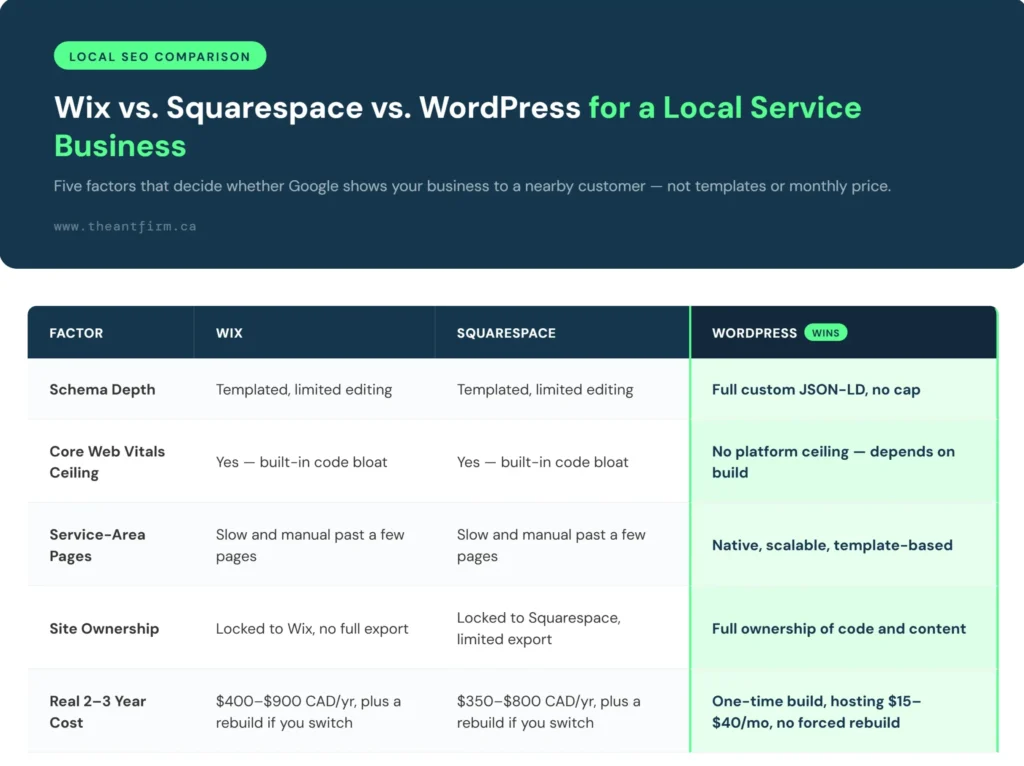
The Question Most Comparisons Skip
Who actually owns the site when you're done?
Website ownership is something people often think about only when they want to switch web designers. By then, changing platforms can be expensive.
With Wix and Squarespace, your website stays on their platform. If you decide to leave, you may need to build a new website instead of moving the existing one. With WordPress, your website belongs to you — the files, the content, and the domain — and you can move it to a new hosting provider or work with another developer whenever you want.
That is why every Toronto web design build from The Ant Firm runs on WordPress. You pay a fixed price of $2,000 and own your website from the day it goes live.
- Move hosting anytime Take the site to a new provider whenever you want
- Add features anytime Update or expand the site whenever your business grows
- Hire any developer Work with someone new without starting from scratch
- Stays with your business Not with the company that built it
Common Questions
Wix, Squarespace, and WordPress — straight answers
Which is better for a local business website: Wix, Squarespace, or WordPress?
The right platform depends on your business goals. Wix and Squarespace work well for simple websites, while WordPress offers more control over SEO, customization, and long-term growth. For businesses targeting local search, WordPress is often the preferred option.
Which platform is better for SEO?
All three platforms support basic SEO features like title tags and meta descriptions. WordPress gives you more control over schema markup, URL structure, page optimization, and SEO plugins, making it easier to grow your search visibility.
Can I move from Wix or Squarespace to WordPress later?
Yes. You can migrate your website to WordPress, but the process may involve updating content, URLs, images, and design. Planning the migration carefully helps protect your existing search rankings.
Which platform is easier to use?
Wix and Squarespace are easier to set up because they include hosting and simple drag-and-drop editors. WordPress takes a little more time to learn, but it offers much greater flexibility.
Which platform gives the most design flexibility?
WordPress gives you complete control over your website. You can customize layouts, install plugins, add new features, and build almost any type of website without the limitations of a website builder.
Which platform is more affordable?
The total cost depends on your needs. Wix and Squarespace include hosting in their plans, while WordPress requires separate hosting and a domain. For larger websites, WordPress often provides better value because you have more control over your website and ongoing costs.
Which platform should I choose for my business?
If you need a simple website with minimal setup, Wix or Squarespace can be suitable. If you want full control, better SEO options, and room to grow, WordPress is the stronger choice for most business websites.